Codex Setup
Windows
System requirements
- Windows 10 or 11
- Node.js 22+
- npm 10+
- Network access
Install
Prerequisites Install Git Bash from Git - Downloads for your OS and click Next until finished.
1. Install Node.js Visit nodejs.org and install the latest LTS.
2. Install Codex In CMD or PowerShell:
npm install -g @openai/codex
3. Verify
codex --version
Configure API
1. Get an Auth Token
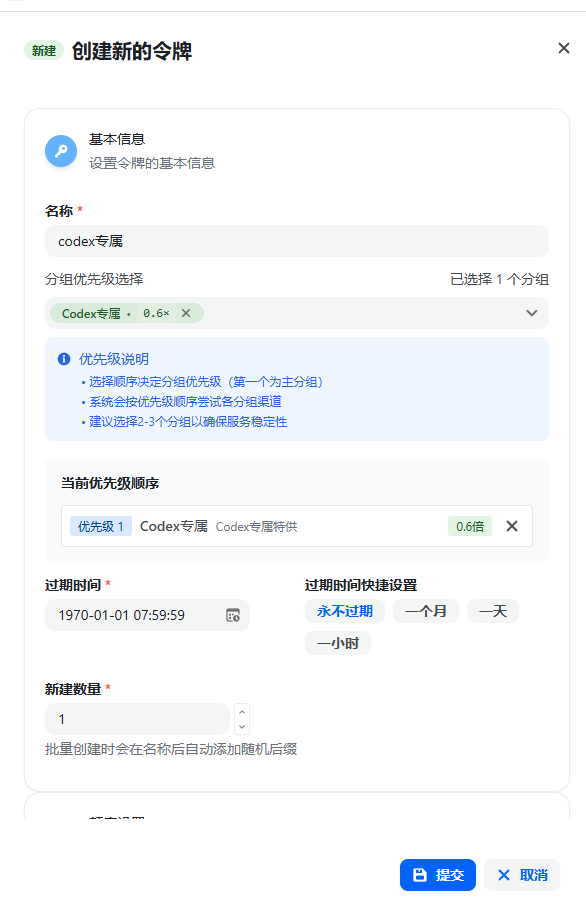
On 在线文档:
- Open Console → API Tokens
- Click Add token
- Group: Codex exclusive (required)
- Name: anything
- Quota: unlimited
- Other options: defaults
2. Config files
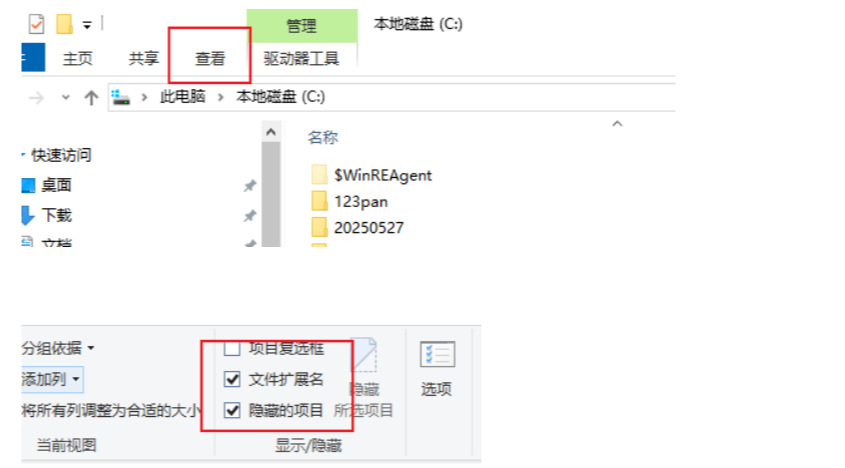
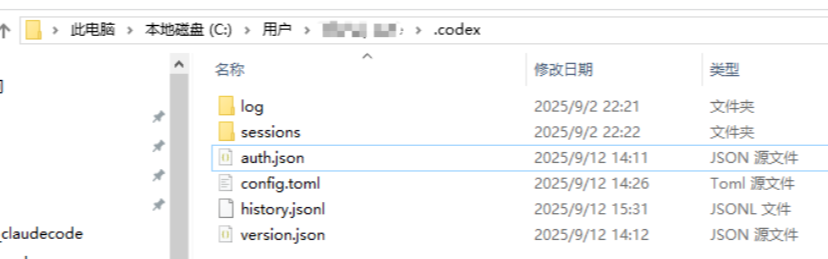
Important: Replace
sk-xxxbelow with your real API key from 4zapi.com!
-
Open
.codexunder your user profile, e.g.C:\Users\testuser\.codex. (Note: enable Show hidden items in File Explorer if needed.) -
If
.codexis missing, create it, then createconfig.tomlandauth.json. -
Fill in the config (replace
sk-xxxwith your real SK).a.
auth.json:{"OPENAI_API_KEY": "sk-xxx"}b.
config.toml(model_reasoning_effort=high/medium/low):model_provider = "api111" model = "gpt-5.6-sol" model_reasoning_effort = "high" disable_response_storage = true preferred_auth_method = "apikey" [model_providers.api111] name = "api111" base_url = "https://4zapi.com/v1" wire_api = "responses" requires_openai_auth = true
Start Codex
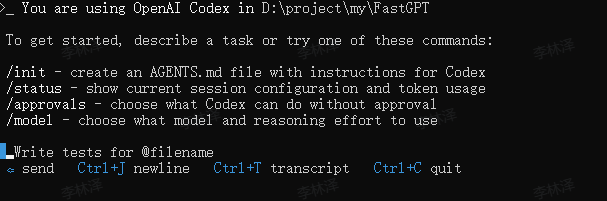
Restart the terminal, then:
cd your-project-folder
codex
VS Code extension
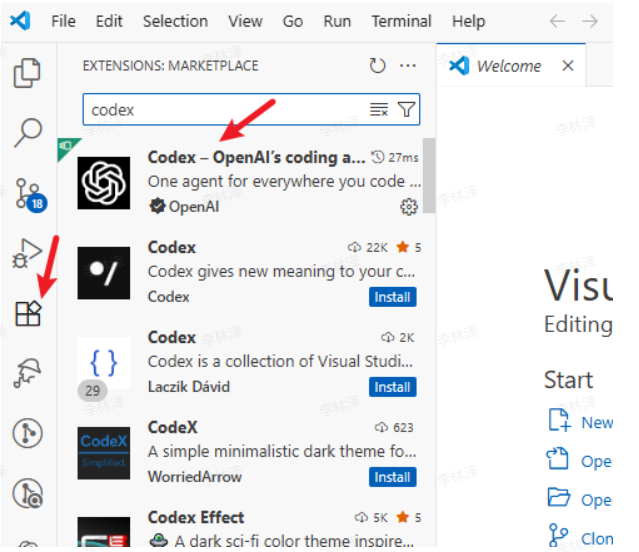
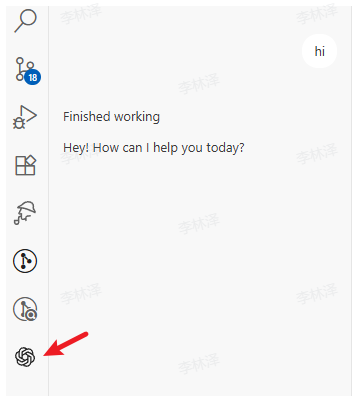
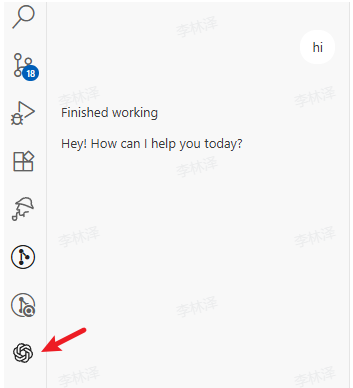
Search and install codex in the VS Code marketplace.
It appears in the sidebar after install.
macOS
System requirements
- macOS 12+
- Node.js 22+
- npm 10+
- Network access
Install
1. Install Node.js
- Option A: Download LTS from nodejs.org
- Option B: Homebrew (recommended)
/bin/bash -c "$(curl -fsSL https://raw.githubusercontent.com/Homebrew/install/HEAD/install.sh)"

brew install node
2. Install Codex
In Terminal (may need sudo):
npm install -g @openai/codex
3. Verify
codex --version
Configure API
1. Get an Auth Token On 在线文档:
- Open Console → API Tokens
- Click Add token
- Group: Codex special (required)
- Name: anything
- Quota: unlimited
- Other options: defaults
2. Config files
Important: Replace
sk-xxxwith your real API key from 4zapi.com!
-
Create files:
mkdir -p ~/.codex touch ~/.codex/auth.json touch ~/.codex/config.toml -
Edit
auth.json:vi ~/.codex/auth.jsonPress
i, paste (replacesk-xxx), thenESC,:wq, Enter.{"OPENAI_API_KEY": "sk-xxx"} -
Edit
config.toml:vi ~/.codex/config.tomlPress
i, paste, thenESC,:wq, Enter.model_provider = "api111" model = "gpt-5.6-sol" model_reasoning_effort = "high" disable_response_storage = true preferred_auth_method = "apikey" [model_providers.api111] name = "api111" base_url = "https://4zapi.com/v1" wire_api = "responses" requires_openai_auth = true
Start Codex
Restart the terminal, then:
cd your-project-folder
codex
VS Code extension
Search and install codex in the VS Code marketplace. It appears in the sidebar after install.
Linux
System requirements
- Common distros (Ubuntu 20.04+, Debian 10+, CentOS 7+, etc.)
- Node.js 22+
- npm 10+
- Network access
Install
1. Install Node.js
- Ubuntu/Debian
sudo apt update curl -fsSL https://deb.nodesource.com/setup_lts.x | sudo -E bash - sudo apt-get install -y nodejs - CentOS/RHEL/Fedora
sudo dnf install nodejs npm # or sudo yum install nodejs npm - Arch Linux
sudo pacman -S nodejs npm
2. Install Codex
sudo npm install -g @openai/codex
3. Verify
codex --version
Configure API
1. Get an Auth Token On 在线文档:
- Open Console → API Tokens
- Click Add token
- Group: codex channel-gpt (required)
- Name: anything
- Quota: unlimited
- Other options: defaults
2. Config files
Important: Replace
sk-xxxwith your real API key from 4zapi.com!
- Create files:
mkdir -p ~/.codex touch ~/.codex/auth.json touch ~/.codex/config.toml - Edit
auth.json:
Pressvi ~/.codex/auth.jsoni, paste (replacesk-xxx), thenESC,:wq, Enter.{"OPENAI_API_KEY": "sk-xxx"} - Edit
config.toml:
Pressvi ~/.codex/config.tomli, paste, thenESC,:wq, Enter.model_provider = "api111" model = "gpt-5.6-sol" model_reasoning_effort = "high" disable_response_storage = true preferred_auth_method = "apikey" [model_providers.api111] name = "api111" base_url = "https://4zapi.com/v1" wire_api = "responses" requires_openai_auth = true
Start Codex
Restart the terminal, then:
cd your-project-folder
codex
VS Code extension
Search and install codex in the VS Code marketplace.
It appears in the sidebar after install.
FAQ
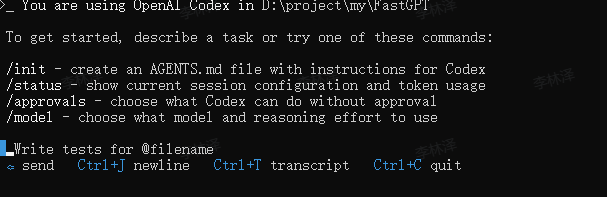
If you hit errors, check:
- API Key: unlimited quota, no model limits, group codex channel-gpt.
See the official Codex docs for more configuration details.